YouTube is one of the globally popular On-line Video Channel. It was maintained by the leader of Search Engines Google. Millions of Videos are available here for Free. How it is after you watch a Video Song if you can download it for your Cell phone? Yap this is a great idea. In the market there are Several tools to do this. Here I am explaining How to Download a YouTube Video using vidtomp3.com. Vidtomp3.com is a commercial website for Video to mp3 Converter. Let’s know the Steps How to do this.
Steps to Download a YouTube Video Song
While YouTube song downloaders are widely used, their legality depends on the content being downloaded. YouTube’s downloads for personal use may fall under fair use in some jurisdictions, but redistributing copyrighted material without permission violates YouTube’s Terms of Service and copyright laws. Users should ensure they have the right to download and use the content.
1. Open YouTube.com. Search your Favorite Song you want to Download. For an example I am looking to Download a Hindi Song “Dheere Dheere Se Meri Zindagi Aana – From the movies Aashiqui“. Open the Video URL. Then Check the Video and Copy the URL.
2. Open vidtomp3.com. Paste the URL in “Enter Video URL below to Convert into MP3” input field. Then Click Download. Now wait for few Seconds. Depending upon your Video length vidtomp3.com will take sometime to Convert the Video. Once the Conversion is successful it will show you the next screen with a Download button.
3. After Convert the Video Videotomp3 will show you a window with the message “Conversion Completed Successfully.”. Then Click on the link “Click here to get your Download Link”.
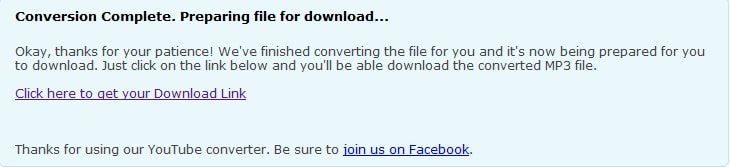
4. Once you Click on the above link it will redirect you to an another page where you can have a Download button. Click on this & wait until your File downloaded Completely.
Understanding YouTube Song Downloaders
A YouTube song downloader is a software or web-based application that allows users to convert YouTube videos into downloadable audio files, typically in MP3 format. These tools also support other formats like MP4, WAV, and FLAC, catering to different quality preferences. The primary function of these tools is to bypass YouTube’s streaming restrictions, enabling users to save music directly to their devices.
Types of YouTube Song Downloaders
1. Online Downloaders – Web-based tools that require no installation. Examples include Y2Mate, OnlineVideoConverter, and FLVto. These are convenient but may have limitations like file size restrictions or ads.
2. Desktop Applications – Software installed on a computer, such as 4K Video Downloader or Any Video Converter). These often provide faster speeds and additional features like playlist downloads.
3. Browser Extensions – Add-ons like Video DownloadHelper for Firefox or Chrome extensions that integrate directly into the browser for quick access.
4. Mobile Apps – Apps like Snaptube or TubeMate (for Android) allow users to download songs directly to their smartphones.
Alternatives to YouTube Song Downloaders
If downloading raises concerns, legal alternatives include:
YouTube Premium – Allows offline playback of videos.
Spotify, Apple Music, Amazon Music – Subscription-based services with offline listening options.
Free Music Archives – Websites offering royalty-free music.
Conclusion
YouTube song downloaders provide a practical solution for offline music access, but users must be mindful of legal and security implications. By choosing reputable tools and respecting copyright laws, music enthusiasts can enjoy their favorite tracks anytime, anywhere. Always prioritize safety and legality when downloading content from the internet.